Simplified time management
JOUROFF has developed an intuitive approach to time management. You can manage both HR working hours and activity-based time tracking.
A range of HR and working time tools in a single time management software:
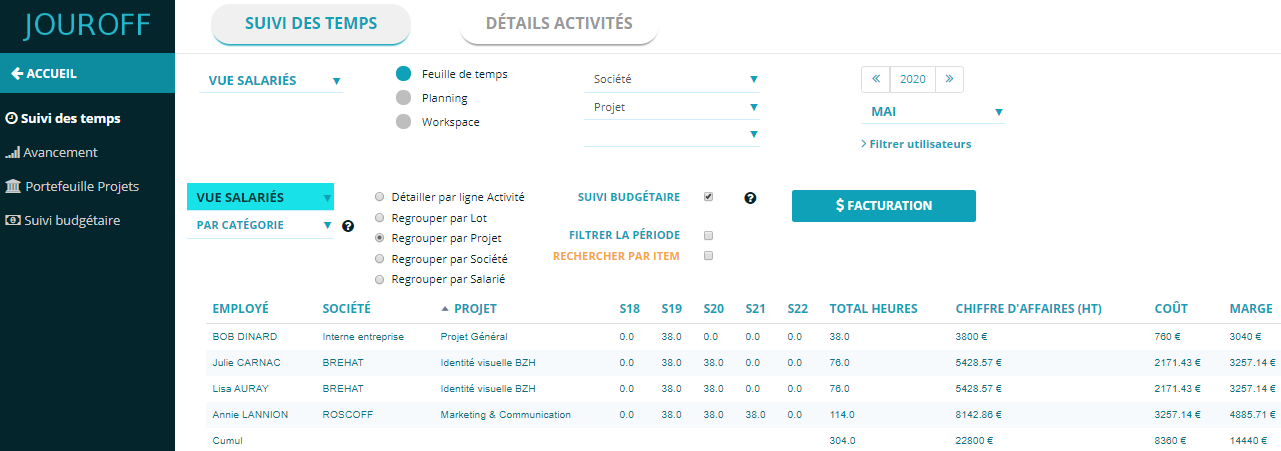
Analytical time tracking by activity, project, or client
HR time management and tracking of employees on annualized contracts
Working time software for time-based billing
Tracking working hours for compensatory time calculation
Working hours software and tracking of forfait-days contracts
Time management and expense tracking per project
Software for equivalent hours or on-call hours tracking
Working hours management software – what is it?
JOUROFF is a time management software offering a wide range of tools for tracking working time.
It covers both human resources time management and activity-based time tracking.
Indeed, employees have access to a tool with several modules, including schedule tracking, vacation and absence management, as well as overtime and time-off recovery tracking.
Thanks to our solution, managing employees’ working time becomes very simple, as time management involves multiple components, both in HR terms and in tracking time allocated to each activity.
For companies wishing to implement analytical time tracking, our time and activity management software offers an intuitive approach to tracking working hours combined with activity monitoring.
This tracking methodology allows you to define your activity database in order to effectively represent your company’s workflow organization.
To effectively meet your working time digitalization needs, it is important to identify your specific use case:
Are employees autonomous in entering hours in the working time software?
Alternatively, do HR managers handle the entry of working hours in the software?
If employees enter hours, is there a validation process?
Does leave and absence management fall within the required features?
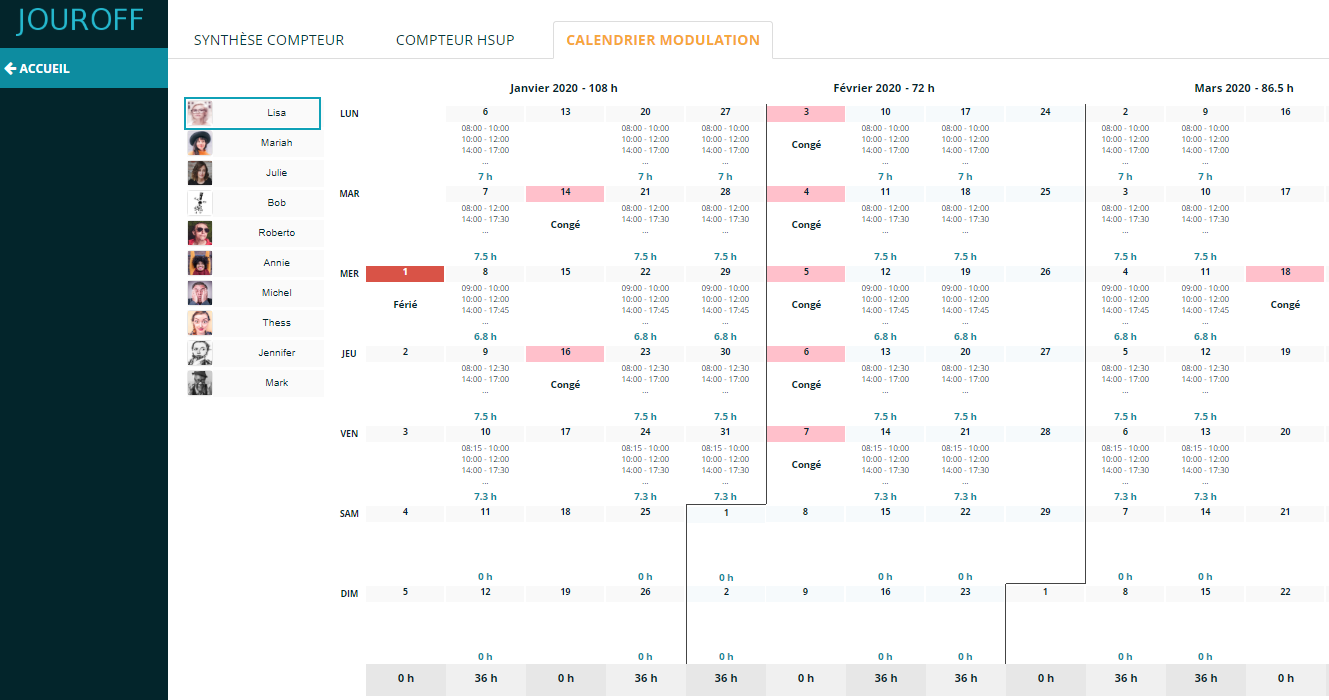
Should the tool account for annualized contracts or working time modulation?
Is there a need to extract payroll variable elements (EVP) at the end of the month?
Does time tracking require a mobile application for more employee autonomy?
Should the software allow meal allowance declarations?
Tracking overtime or compensatory hours
For tracking compensatory hours, our system offers two (2) methods.
(1) Working time counter through the timesheet:
In this approach, employees declare hours worked weekly.
Then the working hours software calculates compensatory hours.
This is done through the timesheet module.
The benefit is that time entry can also be used for managing annualized contracts, if your company uses them.
Tracking annualized hours is common in companies with seasonal activity requiring working time modulation.
Note that annual smoothing of hours requires a working time modulation agreement between the company and employee representatives.
(2) The employee directly declares additional hours week by week to feed their compensatory time counter:
In this case, employees directly declare overtime they believe they worked.
This avoids entering total worked hours, as compensatory hours are calculated directly from employee declarations.
At the same time, the employer can approve or reject the submitted timesheet.
Setting rules for calculating compensatory or paid hours:
Regarding hours accounting, conditions must be defined for hours worked beyond contractual hours, based on:
Threshold and increase rate for Sunday work (compensated or paid?)
Threshold and increase rate for public holidays worked (compensated or paid?)
Weekly threshold for triggering compensatory hours
Weekly threshold for triggering paid hours
Unless your collective agreement states that overtime is always paid and never compensated…
For example, in some companies, the rule is:
– from 35h to 43h => Compensatory time (rest)
– beyond 43h => Paid hours, extracted from the working time software
Hours tracking
When considering time tracking, the first instinct is to find one of the best HR time tracking tools.
Before anything else, it is important to clearly define your needs to choose the right software.
Indeed, hours tracking can cover multiple aspects, as working time may also be project tracking time… and sometimes time for client billing.
It is therefore important to determine whether your need is HR working hours management, project tracking, or both.
To simplify this, JOUROFF offers an adaptable approach to model your system for HR management or activity tracking purposes.
Our tool can be used in the following cases:
HR working hours management
Managing employees with annualized contracts
Activity planning and tracking
Working time management for payroll variable extraction
Resource or workload management
Project portfolio management and tracking
The strength of our software lies in ensuring reliable tracking of worked hours
Working hours accounting
We offer a working time tool that calculates compensatory hours while feeding a counter for compensatory leave or payment depending on company rules.
You can manage hours accounting via timesheets or direct declaration of compensatory hours.
JOUROFF advantages (+++):
Validation process on a weekly or monthly basis
Employees can save drafts and complete timesheets progressively
Hours calculation is fully automated
Synchronization between work schedule and hours calculation
Hours tracking based on start and end times or direct declaration of worked hours
Working time management: what is it?
In companies, time management consists of HR tools and processes designed to track working time organization indicators.
Tracking hours meets both organizational and administrative requirements, as companies are legally required to comply with working time regulations.
We have developed software that simplifies managing employee working hours while integrating contract-specific features.
For example, our HR solution supports forfait-days employees with a daily time entry interface.
Similarly, employees with hourly counters can continue entering hours via weekly or monthly timesheets with start and end times.
How to organize working hours in the time tracking portal?
It is up to each company to organize working hours for all its employees.
Depending on the company’s field of activity, there may be several work organization processes.
For example, a company operating in the software publishing sector usually works on a project-based structure…
In this context, work is organized around clearly defined topics, with set objectives and a predefined amount of allocated time.
However, in most cases, work organization is more agile… In this context, companies must define both short-term and long-term planning and be able to adjust it according to business priorities.
To improve efficiency, it is recommended to use an appropriate HR time-tracking system (HRIS) to automate the work organization process.
As a time tracking software provider, JOUROFF offers a range of HR time tracking tools… including:
HRIS for time management and project tracking
JOUROFF provides a time entry system that enables project time tracking.
This involves modeling your activity and building a tracking database.
Annualized hours tracking tool
This tool allows defining a forecast schedule per employee for annual hours tracking.
At the same time, the HRIS provides an online timesheet interface for entering working hours.
Employees can declare hours independently, ensuring ease of use.
Tool for tracking compensatory hours
Among the features, the software includes a table for tracking compensatory hours, allowing employees to manage their time quota.
This process depends on weekly thresholds based on the employee’s contract.
Time management and resource planning tool
In some companies, work organization relies on scheduling.
The planning module is part of the JOUROFF HRIS system.
The goal is to provide a full set of tools to digitize company processes.
Working time planning with payroll integration
Payroll management requires monthly working time data.
Payroll software like SILAE, SAGE, or others can interface with working time tools.
This is usually done via export/import processes.
Some payroll software provides APIs to automate data exchange, avoiding manual file handling.
Equivalent hours: : what is it?
Equivalent working hours is a specific system in which working time includes inactive periods that are excluded from the total count of effective working hours.
The equivalent hours regime applies in sectors where the employee is required to remain on the workplace, with waiting or inactive periods, without being able to freely attend to personal activities.
Indeed, within the equivalent hours system, the employee remains available to their employer.
In this context, the employee works more hours than the legal working time.
However, the time tracking system only counts a portion of these hours as effective working time.
For example, equivalent hours may run from midnight to 9 a.m., but only 3 hours are counted as actual working time.
This is where a software solution for equivalent hours, such as JOUROFF, simplifies the process by configuring the equivalent working regime in order to automate time tracking, including any applicable overtime premiums depending on your collective agreement.
However, the equivalent hours system should not be confused with on-call duty, which is a system requiring the employee to be available to perform a task at the employer’s request without being at the workplace.
Indeed, during on-call duty, the employee may remain at home or nearby.
Applications of time management
JOUROFF is an analytical time tracking software that automates time entry processes within companies, both from an HR and time tracking perspective.
As a result, you can build your HRIS solution à la carte according to your needs. Our time entry software can be used in the different scenarios listed below.
How to configure a time tracking software?
The main function of a time management tool is to assess time-off recovery or payable hours.
The administrator can access the configuration interface to set weekly contractual working hours per employee.
The user management feature provided by the time tracking tool allows you to define the number of hours worked per week according to each employee’s contract type.
Time capture is done through the implementation of a time clocking system, allowing the HR tool to automatically trigger working time calculation for each employee.
Time management for activity-based tracking
Tools for tracking hours across different activities
Online software synchronized with leave management
Working hours tracking for compensatory leave estimation (RTT absences)
Time tracking for compensatory and overtime hours according to legal agreements Example: 35 to 43 hours at 25%, beyond 43 hours at 50%
SaaS solution for annual working time tracking
Software with time entry interface and working hours modulation
Working hours management with counters based on weekly hours Example: 36h or 42h contracts
HR software for tracking billable hours per project
Managing working time for project budget tracking
Time tracking for managing client projects
In the HRIS software landscape, there are specialized solutions offering advanced time management and hours accounting features.
It is beneficial for companies with multiple employees to use tools that combine these aspects to simplify management.
In time management, it is important to evaluate both employee usability and administrative efficiency, as the goal is to facilitate payroll processing.
Weekly tracking is essential to control time usage.
Companies can aggregate hours data for billing, reporting, or compliance purposes.
Therefore, software reliability is crucial to ensure accurate employee contract tracking.
Try our working time planning software for free now to explore all features of one of the most advanced solutions on the market.
The demo account provides 100% free trial access.
Features of the time management tool
HR Settings - working time
Scope of application
The principle is to configure the threshold, then the software automatically calculates actual working time, highlighting hours worked beyond the employee’s contract.
Here is an example with an employee whose working time is 35 hours per week:
Total hours entered in the timesheet: 39h00
Threshold1 = 39 h – 35 h = 4 h00
Increase = 4 hours * 25/100 = 1 h00
Total = 4 hours + 1 h = 5 h00
Total hours entered in the timesheet: 45 h00
Threshold1 = 43 hours – 35 hours = 8 h00
Threshold2 = 45 hours – 43 hours = 2 h00
That is 10 hours to recover or to be paid.
Increase = (8 hours * 25 / 100) + (2 * 50 / 100) = (2 h) + (1 h) = 3 h00
Total = 10 hours + 3 hours = 13h00