Easily Plan Your Employees’ Absences
Track absence requests, RTT, sick leave…
Employee absence planning, including remote work
Manage meal vouchers and expense report declarations
Calculate vacation balances and update automatically
Export counters to Payroll
Automatic carryover of balances (time savings account, CET…)
Watch the Leave software video

What is absence tracking?
Absence tracking is a set of procedures that make it easier to calculate vacation balances and visualize employees’ leave counters. Our leave management tool integrates HR social rules regarding the number of vacation days earned per month or per year.
To simplify the process, JOUROFF, as an online HR portal, allows you to automate the HR workflow—from the employee’s absence request to the manager’s approval. Thanks to automation, absence tracking becomes a straightforward task in your human resources management.
With just one click, the automated absence tracking table—replacing your Excel vacation balance sheet—generates a monthly summary of days taken to date. At the end of the month, an Excel tracking table can be exported to be shared with the payroll manager or accountant for further administrative processing.
For more details, you can create a free demo account or watch the absence tracking video available on our website.
Why choose JOUROFF?
99% of our clients are satisfied (see client reviews)
At JOUROFF, we design our own graphical interfaces, allowing us to adapt our HR solution to your needs.
Our priority is to support you throughout your HR digitalization experience. Initially, the most noticeable features focus on HR process automation… But since time tracking can be complex, JOUROFF also offers advanced features, including:
♦ Automatic carryover of vacation balances from one period to another
♦ Counting meal vouchers based on vacation days taken
♦ Operations on vacation counters, e.g., adjustments as debit or credit
♦ Profile-based visibility of counters depending on the employee’s contract
♦ Counters dedicated to employees on daily rate contracts
♦ Create as many counters as needed—all on the same schedule!
Examples: Remote work, unpaid leave, fractioned days, seniority, etc.
Employee Vacation Table
We offer an HR portal that automates the employee absence tracking process.
Employees initiate requests from their personal space, and the manager receives a notification to approve the absence. In parallel, balances are updated automatically, with the option to export payroll variables.
You can also add approved leave days to your Google or Outlook Calendar.
JOUROFF’s absence tracking simplifies your life by automating the HR process and leave requests, including meal voucher counters, part-time employees, and daily rate employees.
You gain full control over employee absence planning.
Absence Tracking and Counting Rules
Rules for evaluating absence counters
Counting vacation days as working days or calendar days
Counting vacation days for part-time employees
Number of rest days per month
Export of vacation and absences to payroll
As an HR manager, I can delegate approval to another colleague or manager
Seniority Rules Configuration
Some collective agreements grant seniority-based leave to employees who meet certain criteria.
The primary condition is the employee’s start date in the company, but in some cases, age may also be considered for additional seniority days.
The JOUROFF leave tracking table allows you to configure seniority day rules dynamically.
These rules are based on each employee’s socio-professional category according to your collective agreement.
The following table presents the seniority day rules that can be automated using the HR tool.
Manager Approval
As an administrator, I can access the Vacation Tracking space assigned to each manager:
Absence requests pending approval
Teams to approve
Manager delegations
Export Counters to Payroll
Header, date format, etc.
You define the column order by drag-and-dropYour Excel table is fully customizable and can then be easily imported into payroll. This procedure ensures that the leave tracking table is compatible with most payroll management solutions on the market.
Absence Tracking for Employees on Daily Rate Contracts
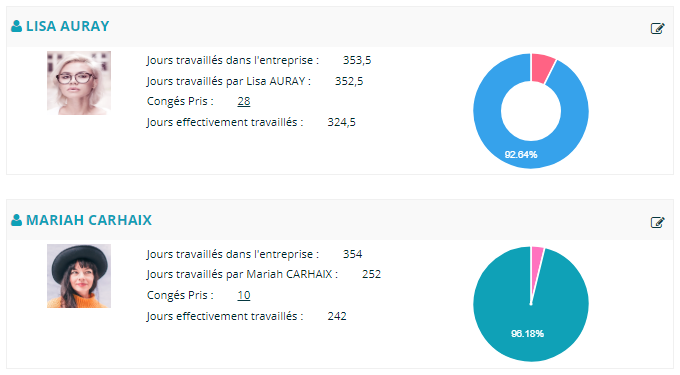
With our leave tracking table and reporting, we highlight both the days actually worked and the days of leave taken by the employee.
The absence tracking table provides an overview that allows you to:
Monitor legally required vacation periods
Manage employees on daily rate contracts
Better organize team schedules according to activity peaks
Practical Cases for Vacation Tracking
Counting in Working Days vs. Calendar Days
Counting in Working Days vs. Calendar Days
A common question in absence tracking is the difference between working days and calendar days.
This distinction is particularly useful for determining the number of rest days per month.
Calendar days include all days of the week except non-working public holidays and the weekly day off (usually Sunday). This means a standard week is considered to have six calendar days, including Saturday, which is not considered a weekly rest day.
Working days refer to the days when your company is actually open and employees are expected to work.
To make this easier, the JOUROFF absence tracking portal offers an advanced configuration space, allowing you to choose the option that fits your situation.
By default, the HR tool assigns 2.08 days of rest per month for the working days mode (25 working days per year) and 2.5 days of rest per month for calendar days (30 calendar days per year).
However, the absence tracking system allows you to fine-tune the acquisition rules according to your collective agreement.
Acquisition and Balance Counting System
Once you understand the difference between vacation days in working days versus calendar days, counting vacation becomes straightforward.
The basic rule is that the system counts from the first day the employee was expected to work and then includes all working or calendar days until they return.
In other words, vacation counting is based on the number of working or calendar days within the absence period.
The goal of the HR portal is to fully automate your HR process—from employee date entry to balance calculation.
Counting for Part-Time Employees
Part-time employees are subject to the same calculation rules.
For example, an 80% part-time employee who does not work on Wednesdays:
Vacation acquisition rules remain the same as for full-time employees.
However, the calculation of vacation days is based on the working or calendar days within the vacation period, including days not worked due to part-time status.
These counting rules can be complex and time-consuming. That’s why the JOUROFF HR portal provides a space to define the basic rules, after which the absence tracking system takes care of the rest.
Essential Features in Absence Tracking
While ease of navigation and usability are important for the user, an absence tracking portal should also be considered a professional HR tool.
Therefore, it must meet advanced technical feature requirements. Essential functionalities include:
Vacation tracking solutions that include part-time employees.
Counting in working or calendar days. For calendar days, the system should deduct Saturdays as calendar days.
Absence planning integrated with meal vouchers. The vacation tracking table counts one meal voucher per day of leave.
Absence tracking that includes seniority-based leave rules, e.g., 3 extra days for 15 years of seniority. This automation is managed according to seniority rules defined in the HR tool, following collective agreement guidelines.
Visibility of HR rights by employee contract type. For example, the ability to show or hide time-off days (RTT) for part-time employees.
Reference period configuration. Define whether vacation is managed from January to December (calendar year) or from June N to May N+1.
Vacation request conditions. Define whether negative balances are allowed and whether absences outside the legal period can be requested.
Online absence planning including recovery days. The JOUROFF leave tracking table allows recovery days to be declared, with managers receiving notifications to approve them.