Intuitive management of working time and activities
GTA software for tracking hours by activity or project
Recording of working hours or recovery of hours
HR GTA software that allows tracking of annualized hours modulation
Generation of monthly reports for payroll variable elements
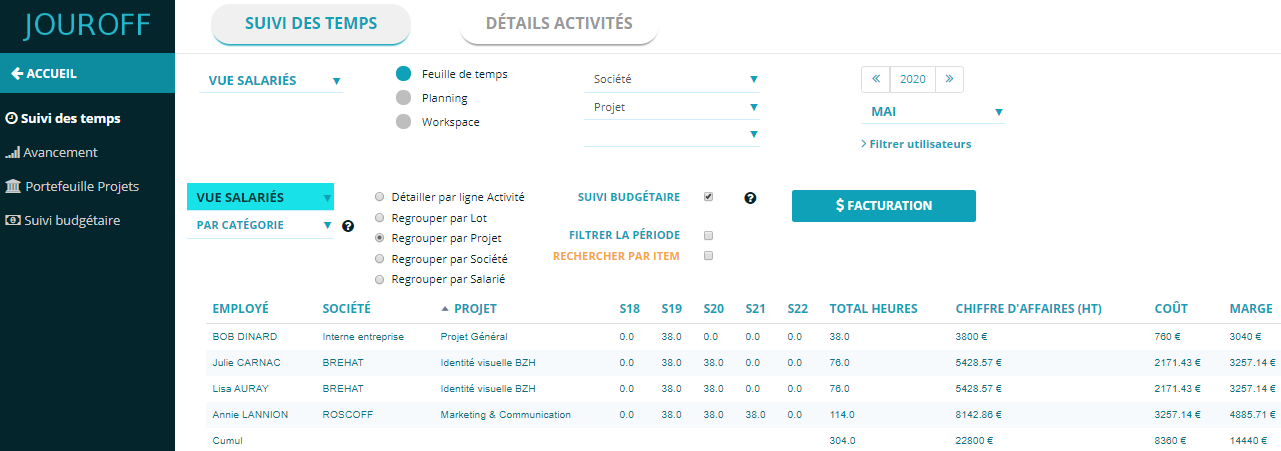
HR GTA for budget tracking of projects by client or portfolio
Discover the time tracking module video

GTA tool for managing time and activities
A GTA software allows you to manage employees’ working hours while ensuring tracking of time spent on the various company activities. This can include project time tracking, workload management, or budget monitoring.
Rather than using multiple tools, our GTA software centralizes working hours tracking and the reporting of tasks or activities performed by employees.
Indeed, beyond time entry from an HR management perspective, our tool also allows you to deploy a time management system with the ability to model the database linked to your information system.
The goal is to better represent the activities managed within your company.
This flexible business-oriented modeling approach is based on our adaptable data model, ultimately providing you with an analytical tracking dashboard.
Thanks to our activity management approach, you can operate in an HR resource planning context for employee working hours, or use the Activity Portfolio feature for analytical tracking.
In all cases, you feed a single source of information, namely your timesheet and activity tracking system, which is sufficient for the software to generate advanced analytical indicators for time tracking.
Calculation of working hours per employee
What is GTA software?
Any company that employs staff is required to implement a time management system to ensure tracking and traceability of working hours.
Some companies may settle for a simple tool to record contractual hours worked by employees.
In some cases, the company may need to specify activities or job positions for analytical tracking of time spent.
The objective is to highlight the distribution of working time by activity.
This is where GTA software becomes essential, covering all aspects of time management through a single interface.
In other words, GTA software can consolidate working hours for HR purposes, and time tracking by project to ensure effective management of company activities.
Activities can be organized by department, by client, or by project portfolio.
GTA can also include budget tracking, such as billing based on time spent, and monitoring HR costs on activities or projects.
Our GTA tool guarantees these different functionalities.
To track employees’ working hours, companies generally use a time management tool for schedule tracking or activity reporting, also known as CRA.
A GTA software is an IT tool that allows easy tracking of individual hours and activities carried out by each employee through a time entry interface.
Activity reporting is generally done electronically in the form of a digital timesheet.
Ultimately, the HR GTA tool aggregates hours and produces a time summary by automatically applying the management rules configured by the administrator.
There are several components in the automation of schedules and activities.
If your project consists of tracking hours without necessarily specifying hours by activity, our solution offers a module called presence hours, allowing each employee to indicate arrival time, breaks, and departure time.
Such time tracking can include overtime calculation or automation of annualized hours, without necessarily integrating activity reporting functions.
How to configure GTA software?
The first parameter to consider is the contractual number of hours to be worked per week, in other words, the weekly working time defined in each employee’s contract.
Our GTA administration interface provides a user management module that allows configuring the weekly duration linked to the contract, as well as the threshold for triggering overtime.
The company must also implement the activity structure, as well as the tasks that make up these activities, especially if you want to track hours by activity.
For the rest, your employees can declare their hours from the timesheet module by specifying the relevant activity.
Working time reporting for human resources management
To calculate hours, our tool offers an intuitive and flexible approach regarding the source of information linked to time entry.
Indeed, depending on your organizational constraints, time entry can be done via individual timesheets, or via a team activity schedule.
Then, from our feature configuration module, you simply specify the source of information, allowing the software to aggregate time entry data from the correct source, and then trigger updates of time management KPIs.
If you want to accumulate hours per employee, you can, for example, apply the “Group by employee” filter.
The software thus allows control over the monthly or annual working hours volume of each employee.
If you are looking for free GTA software, we offer at the bottom of our site a panel of free tools in the form of an online simulator.
What indicators for time and activity management?
JOUROFF has developed an intuitive approach to time and activity management, adaptable to all business sectors (IT, service companies, public sector, etc.).
Indeed, our system allows both time declaration for HR management needs and analytical activity tracking through an intuitive process based on the following principle:
You enter your hours in the timesheet, then access an activity management dashboard with pre-built indicators.
No more Excel formulas and macros to manage employee hours or activity-based time volumes.
Analytical tracking of time spent
The activity reference framework of the GTA solution
To provide you with a comprehensive view, our SaaS solution offers a concept called Activity Reference Framework, which is your database for time management and activity tracking.
The activities defined in the framework are applicable to different projects or clients within your company.
For companies that want simplified time and activity tracking, the activity framework is not mandatory, as this concept adds an analytical dimension suited to companies that bill by time or need to justify hours allocated to different activities, such as associations or consulting firms.
Project portfolio in GTA software
To ensure effective time tracking, the GTA software includes an HRIS module that organizes activities by work context, also known as a project portfolio.
Our time and activity tracking approach proposes a three-level structure: Client => Project => Work package => [list of activities]
As with the activity framework, the concept of a project portfolio is not mandatory; it depends on the activity structure you wish to implement.
This model is suitable for project management combined with activity tracking, or for companies handling hours eligible for tax credits.
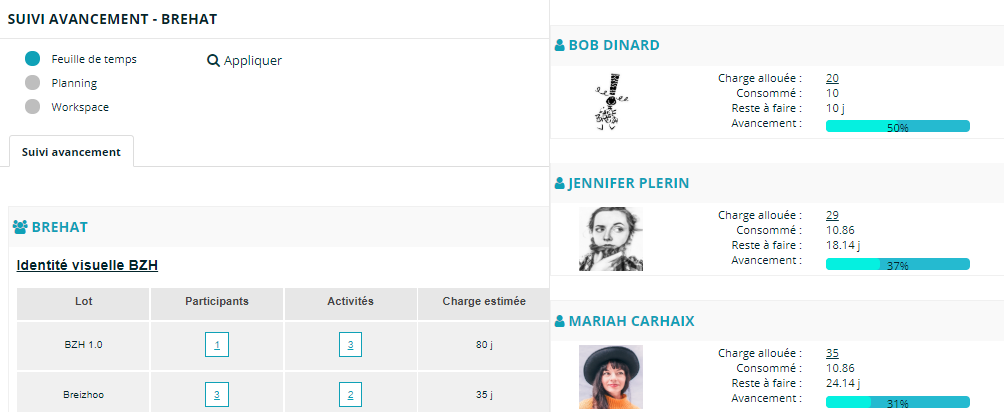
SaaS GTA tool to track project progress indicators
Thanks to pre-built indicators, our solution allows tracking of hours consumed by activity or resource without coding statistical formulas.
All you need to do is fill in your activity schedule or online timesheet.
At the same time, our tool feeds a summary dashboard that helps monitor indicators such as:
> Hours consumed by activity portfolio or by client
> Hours per activity
> Budget tracking to control costs and potential deviations per project
> Comparison between planned and actual work
Project tracking
GTA software and staff scheduling tracking
Our HR solution provides standardized activity management.
Before managing activities, you have the option to populate the Activity Reference Framework.
This same framework feeds all your business processes based on timesheets, schedules, or task management.
The GTA software developed by JOUROFF also allows workload planning with pre-allocation of activities per employee.
At the same time, you have access to a capacity planning tool.
HR consolidation and leave tracking
Managing leave and absences has never been easier!
At JOUROFF, activity management integrates paid leave and absence management.
You can automate the leave management process for better visibility in resource planning.
Thus, thanks to our leave and scheduling tool, you can manage both activity schedules and leave/absence schedules.
If you want to go further in the leave management process, the GTA software designed by JOUROFF allows configuration of HR GTA management rules for tracking paid leave, leave-taking rules, balances, and various leave-related operations.
Working hours calculation and compensation
In terms of time tracking, some companies need to account for hours exceeding legal or contractual limits.
These are overtime hours, which may result in compensatory rest or payment based on the provisions of each company’s collective agreement.
Our time management software allows tracking of compensatory hours by automatically updating a dedicated counter for each employee.
The overtime counter provided by the software can be either compensatory or paid.
Depending on the case, overtime premiums can be applied through configuration of thresholds specific to each company or collective agreement.
This approach gives the GTA software its ability to adapt to your needs for digitizing working time, both for HR indicators and activity management.
Application areas of time management
GTA software allows consolidation of working hours tracking and activity management.
This type of automation solution improves productivity, as you better control the hours allocated to your company’s resources.
To simplify your daily HR management, you can activate the different modules included in our SaaS GTA solution.
The online GTA portal can be used in the following cases:
GTA for tracking activities within a project
Time tracking tool for different company activities… This activity-oriented approach enables effective management of your employees.
Online GTA software in the context of leave and absence management
Management of a time counter for compensatory hours
Schedules and activities to track overtime and premiums. Example: Hours worked between 35h and 43h with a 25% premium, and above 43h with a 50% premium
HR and GTA solution to track annual hours, with definition of the number of hours to be worked per year
Time tracking in the context of working hours modulation by period
Implementation of a compensatory counter based on hours worked beyond weekly working time
Free GTA simulator version available at the bottom of this site
Activity management for budget tracking purposes (cost monitoring based on hourly wage rates)
Management of internal projects or client portfolios
At the bottom of this site, discover our 100% free GTA tools for hour calculation, with download of the Excel hours file
Features of the GTA software
Software settings
Scope of time tracking
Depending on the different employment contracts within the company, the employer can define directly in the GTA software the thresholds for overtime calculation and premium rates.
Here is an example of time tracking for a 35-hour weekly contract:
(1) Hours worked by the employee: 39 hours
Overtime Threshold-1 = 39 hours – 35 hours = 4 hours
Overtime premium = 4 hours x 25/100 = 1h
Total overtime = 4 hours + 1 h = 5 hours
(2) Hours worked by the employee: 45 hours
Overtime Threshold-1 = 43 hours – 35 hours = 8 hours
Overtime Threshold-2 = 45 hours – 43 hours = 2 hours
That is 10 gross overtime hours
Overtime premium = (8h x 25/100) + (2 x 50/100) = 2h + 1h = 3 hours
Total overtime retained by the software = 10 hours + 3 hours = 13 hours
Our GTA software provides an online space to define the conditions for triggering paid overtime… At the same time, the software updates a time counter for overtime payments. The GTA software includes an adjustment feature to settle paid hours at the end of the month.
The GTA software allows management of employees on day-rate contracts. In this context, the software tracks the number of days worked per year, as well as leave and absences.
Example: Number of days worked per year = 218 days, annual leave = 25 days, other absences = 10 days.