Overtime management and working time calculation
Overtime thresholds and weekly working hours
Work hours entry and Manager validation
Automatic overtime calculation
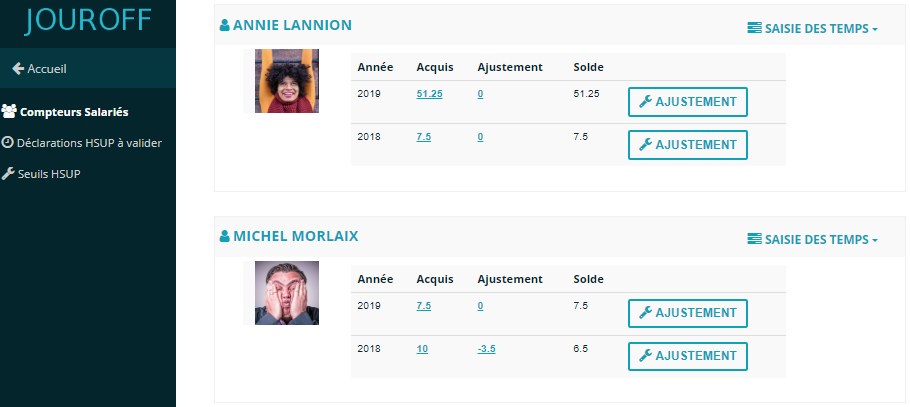
Compensatory time or paid overtime counter
Overtime and compensatory time video

Overtime calculation and management in 3 steps
No more Excel spreadsheets for overtime calculation, the JOUROFF time tracking and calculation software automates the overtime management and premium process.
From employee time entry to exporting counters into an Excel file.
Overtime management: what is it?
Overtime represents the number of hours worked beyond the weekly working time.
In France, the standard legal weekly working time for a full-time employee is 35 hours.
However, working time arrangements may allow 37 or 39 hours, with the possibility of benefiting from compensatory rest, either contractual or fixed.
Given the many specific rules depending on collective agreements, overtime calculation can be complex and time-consuming.
That is why we have developed a powerful overtime software to simplify your work and save you time.
(1) I define the weekly working time
(2) The employee enters their hours
(3) I export the summary into an Excel file
How to calculate overtime?
Overtime occurs when the legal weekly working time is exceeded.
Each employee’s situation must be assessed differently depending on the working time defined in their employment contract.
The rules for calculating overtime differ depending on company collective agreements.
The JOUROFF overtime software provides settings that allow you to adapt management rules to your company, including working hours and possible premium rates.
It is important to note that overtime premiums are not mandatory; this depends on the provisions of your collective agreement.
Your accountant can guide you on the regulations governing overtime in your business sector.
Overtime is calculated per calendar week, meaning the week starts on Monday and ends on Sunday.
If premiums apply, the JOUROFF overtime software allows you to easily configure time ranges and applicable premium rates.
Overtime calculation and time entry
The JOUROFF overtime software offers two ways to capture time entry.
(1) Via timesheet and activity tracking
Each employee reports their weekly activity, and the software uses activity hours to determine overtime.
(2) Direct overtime declaration
Another option provided by the software is direct overtime declaration via an overtime form.
This approach is suitable for companies that do not require activity-based time tracking.
Start and end time calculation or based on total hours worked
For companies that prefer entering hours based on start and end times, this can be configured easily in the software.
You can choose to declare total hours worked or specify exact times.
The JOUROFF overtime software offers flexible overtime management according to your needs.
Overtime premiums
Thresholds determine overtime based on hours worked by the employee.
According to your collective agreement, you can define overtime premium rates by time brackets.
In a standard case without premiums, only one threshold is defined.
Example of overtime thresholds:
(a) Standard case without premium:
Beyond: 35h, up to: unlimited
Premium rate = 0%
This threshold applies to a 35h contract where from the 36th hour onward, overtime is counted without premium.
(b) Overtime with premium:
Threshold 1:
Beyond: 35h, up to: 43h
Premium rate = 25%
Threshold 2:
Beyond: 43h, up to: unlimited
Premium rate = 50%
Overtime for night work and public holidays
The JOUROFF overtime software allows handling premium rates for overtime worked on public holidays and at night.
JOUROFF also manages other cases such as Sunday work, as the system allows dynamic configuration of specific activities where working time results in premium pay.
Additionally, the software provides a summary of time counters, including: normal working hours, overtime with or without premiums, and hours increased through specific activities.
Examples of specific premium activities may include: public holidays worked, night hours, Sunday work…
Overtime tracking and annualized contracts
Annualized working time consists of organizing working hours over a full year.
In this context, employees may work more hours during busy periods and fewer hours during slower periods.
Working hours are balanced from one week to another to maintain an average weekly working time.
To control annual working hours or overtime quotas, the JOUROFF overtime management software allows managing an annual tracking dashboard.
Overtime identified at the end of the period can feed a counter for compensatory time or payment.
This counter is managed annually and, depending on calculation rules, can accumulate overtime week by week.
Depending on the case, accumulated overtime can be taken as compensatory rest or paid.
Overtime and leave management software
Overtime calculation and leave synchronization…
The JOUROFF overtime software includes a time entry tool that takes into account employee leave requests.
In addition to overtime calculation, the software also manages leave and absences.
Overtime calculation
Weekly overtime thresholds
Time thresholds determine overtime or additional hours for part-time employees, depending on weekly working time.
The overtime software allows defining premium rates according to your collective agreement.
In the software operation, you must then assign thresholds to each employee via the user management interface.
Each employee can have up to three thresholds, especially if multiple premium brackets are required.
In a standard case without premiums, only one threshold is defined.
Example of overtime thresholds:
(a) Standard case without premium:
Beyond: 35h, up to: unlimited
Premium rate = 0%
This threshold applies to a 35h contract where from the 36th hour onward, overtime is counted without premium.
(b) Case with overtime premium:
Threshold 1:
Beyond: 35h, up to: 43h
Premium rate = 25%
Threshold 2:
Beyond: 43h, up to: unlimited
Premium rate = 50%