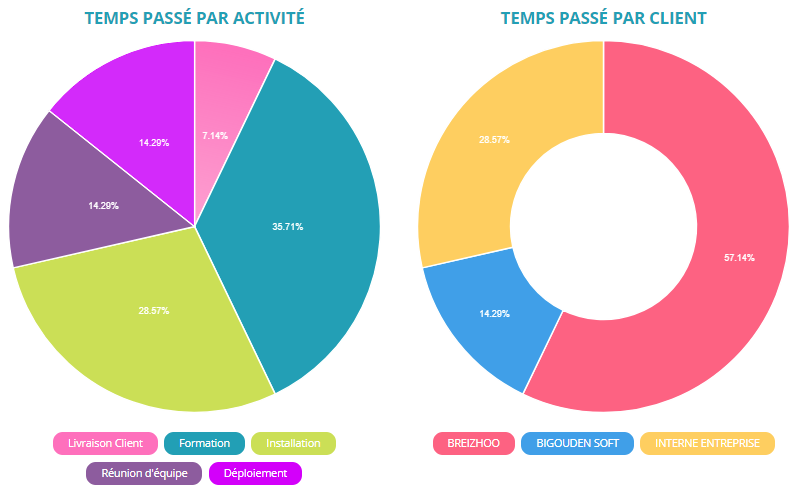
3 axes for project tracking: Time spent, Forecasted days, Budget
Creation of project structure: portfolios, sub-projects, tasks...
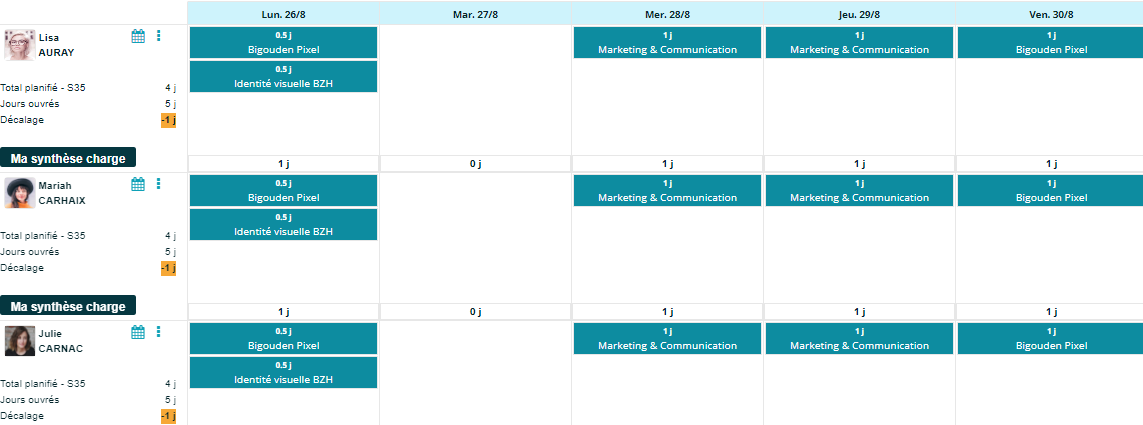
Task planning by employee or capacity planning
Project budget and tracking of budget overruns
Analytical tracking of time spent: breakdown of time consumed by resource or by project
Project resource planning
What is project management software?
Project management software is a tool that helps organize project activities to achieve objectives on time.
It offers resource planning features to help project managers manage key components for successful execution.
Tracking consumption on a project
The time consumed on a project is a key indicator to ensure its proper progress.
We can take the example of a consulting firm where the number of billable days is defined in advance.
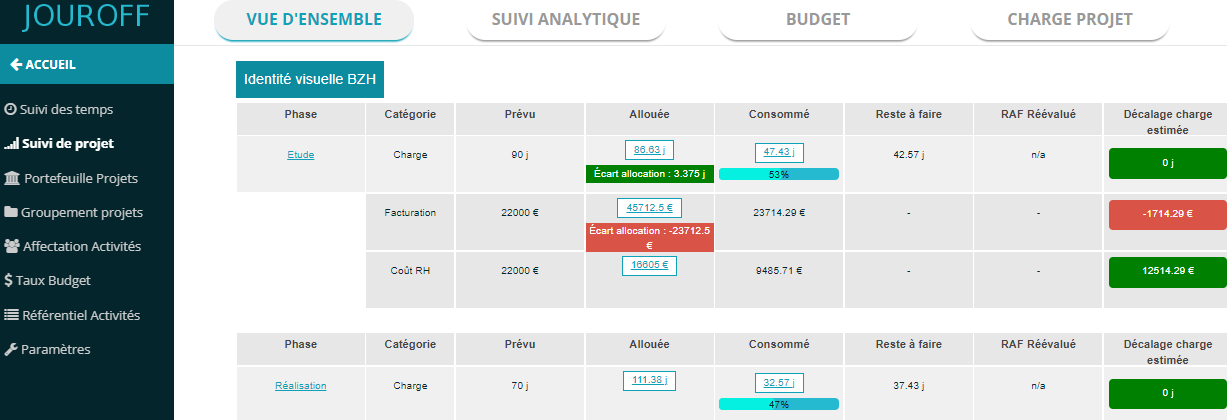
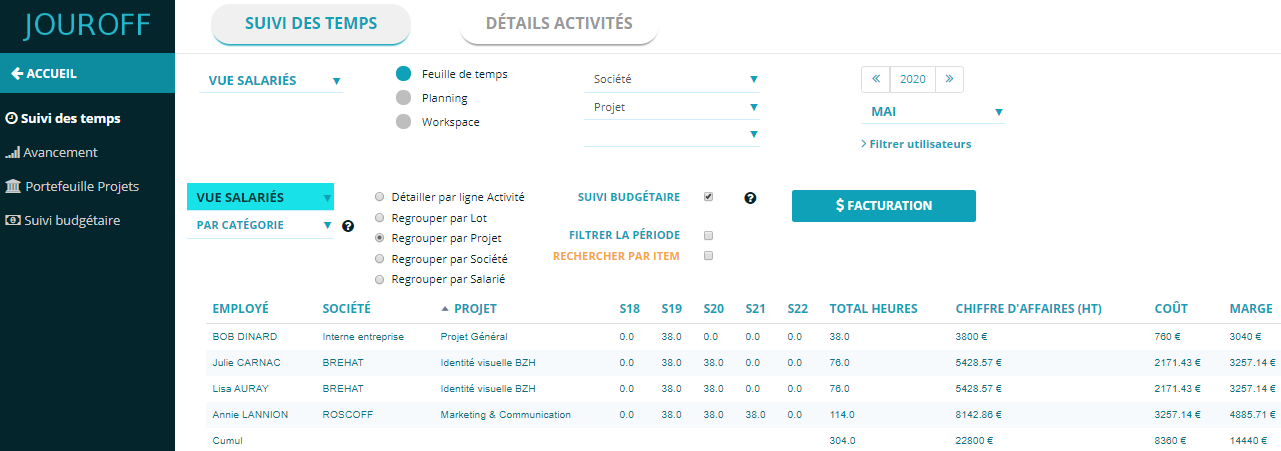
Thanks to the analytical time tracking feature, the project manager can instantly monitor the time spent on the project, the resulting deviation, as well as the employees involved in each phase of the project.
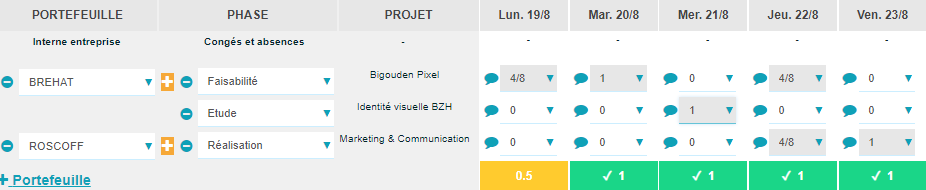
The software provides each employee with a dedicated timesheet space to record the number of hours spent on a project, by phase, etc.
If you have profitability or budget tracking requirements, the total hours per phase are correlated with the fee amount, allowing you to calculate project profitability.
Indeed, our job costing software provides a project profitability overview.
The JOUROFF project management software can be used across various industries, including construction, consulting firms, and engineering offices.
Why choose JOUROFF project tracking tool?
The strength of our software is based on two key aspects: modeling and analytical tracking.
Indeed, most software solutions provide a three-level data structure: Project => Sub-project => Tasks…
Whereas JOUROFF software offers a flexible data model that allows you to build your activity database with full flexibility, up to 8 levels of representation.
You can model resources such as project portfolios representing clients or business units, which contain projects, which themselves contain work packages or sub-projects, followed by the list of activities or tasks, or even service items depending on your business.
You also have the concept of analytical dimensions to model project groupings or shared characteristics across projects.
The other key feature of our project software is analytical tracking.
This consists of breaking down time spent or tasks by resource, giving you a 360° view of time consumption across the company or project portfolios.
Project management in JOUROFF – how it works
Information system modeling: project structure
Our resource planning tool places great importance on data representation.
We started from the observation that software is now SaaS (online software) with a pre-coded data model. This does not leave much room for companies to have a custom solution or one that closely matches their business.
That is why we designed an adaptable data model that represents your business context.
Thanks to this adaptability, the organizations we model can be both simple and complex. For example, a company may want to highlight internal HR management activities on one side, and research and development (R&D) projects on the other.
To achieve this, our system provides a framework that allows creating multiple activity categories.
Analytical axes: shared characteristics or groupings of projects.
Following the example above, R&D-type projects may have additional business constraints.
For example, some R&D projects may be eligible for tax credits (CIR or CII), and our tool provides a project grouping feature as an analytical axis.
It then becomes possible to filter projects with tax credit characteristics in order to track indicators specific to these projects.
Note that analytical axes can be applied in many possible cases, such as filtering a funding source linked to one or more projects.
For example, European funding for projects that must justify funding granted by the European Union.
Project task planning
Task planning within a project is a key function for ensuring its successful execution.
In JOUROFF software, the days to be consumed can be defined globally for a project. This is similar to the overall project estimation.
However, forecasted days can also be distributed per employee in order to build a task planning schedule that takes organizational constraints into account for each team member, including holidays or absences in the project schedule.
This approach of assigning project tasks to team members makes it possible to build a schedule or reverse schedule that is as close as possible to real operational conditions.
It should be noted that a reverse schedule is a backward planning method in which the project delivery date is defined first, followed by the tasks required to reach that deadline.
In other words, in reverse planning, the end justifies the means.
Here is an example illustrating a project reverse schedule for a website development project.
Domain name reservation 1 year before (as the project deadline)
Creation of website sections 8 months before
Content creation 6 months before
Website design 1 month before
Etc.
Whether creating a standard Gantt chart starting from task initiation, our planning tool aims to schedule actions and tasks over time, date by date, for each team member.
Alignment between project forecast and actual time
Task planning aims to ensure deadlines are met, but above all to avoid budget overruns or excessive time consumption.
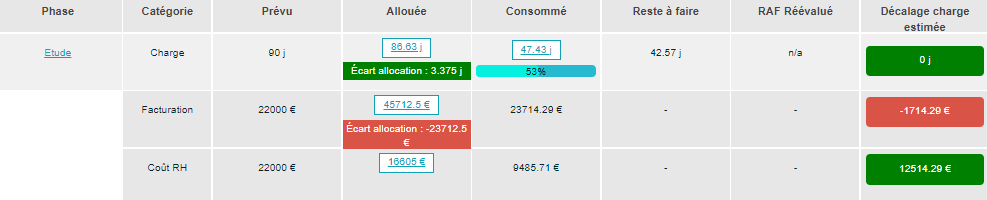
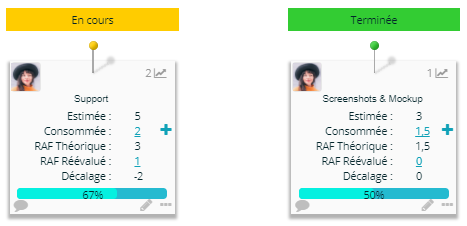
To maintain balance between forecasted and actual usage, our software provides a module that allows comparison between the allocated volume and the time consumed on the project.
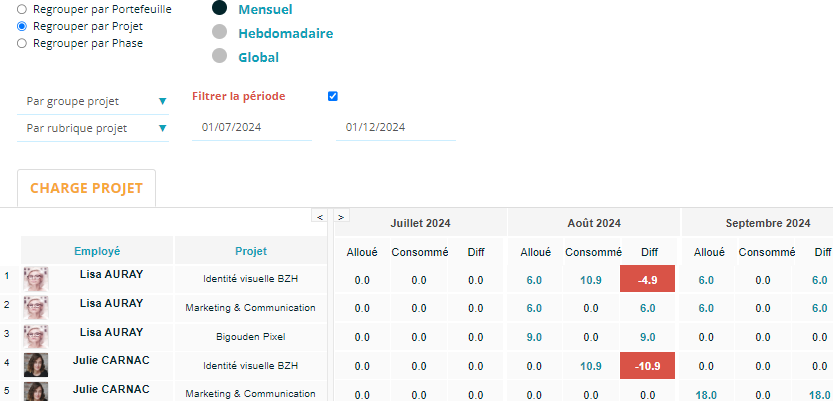
When planned days are not respected, the software displays the variance or consumption gap in red to alert the project manager.
Below is an example illustration:
Project forecast estimation preferences
Project management varies depending on companies and contexts.
Sometimes only actual time is tracked without a forecast.
In other cases, no global estimate is defined, and instead, allocated days per employee determine the total forecast.
To address these needs, JOUROFF offers several estimation options:
Disable forecast tracking:
No forecast indicators will be displayed for this project.
Fixed value:
Global estimate of the project. Example: 100 days estimated.
Fixed value with comparison to allocated days:
Global estimate compared with total allocated days to measure variance.
Sum of allocated days per employee:
The total estimate equals the sum of days allocated to each employee.
No forecast, track only actual time:
The software focuses on time recorded in timesheets.
Budget estimation preferences
Disable project budget:
No cost or profitability indicators will be displayed.
Fixed value:
Global project budget. Example: €80,000 estimated.
Fixed value with HR cost comparison:
Global estimate compared to forecast HR costs per employee.
Sum of HR costs allocated per employee:
Total equals sum of allocated days converted into HR cost.
No forecast, track only actual cost:
The software focuses on time recorded in timesheets.
Fixed value with billing comparison:
Global estimate compared to forecast billing amounts.
Sum of billing amounts per employee:
Total equals sum of allocated days converted into billable amounts.
No forecast, track only billable amount:
The software focuses on actual recorded time.
Time entry and analytical tracking
One of the key components in project tracking is time tracking per resource.
Our time management tool relies on data modeling carried out upstream in order to generate relevant indicators.
As described in the introduction, the first step is to model your data structure.
This is done through our data format, designed to better reflect your business.
This step helps highlight the types of resources managed within your information system.
Depending on your time and activity tracking requirements, the JOUROFF project tracking software allows you to create project portfolios representing clients or areas of expertise.
Within these portfolios are projects, which can in turn be modeled into multiple phases.
The goal of the project tracking software is to provide a dashboard that allows you to control time spent per project, per employee, or per activity.
Task planning
Depending on organizational constraints, not all projects require task scheduling within a fixed timeframe.
Task organization with deadlines or milestones is generally used for projects with strict delivery timelines, most commonly IT projects.
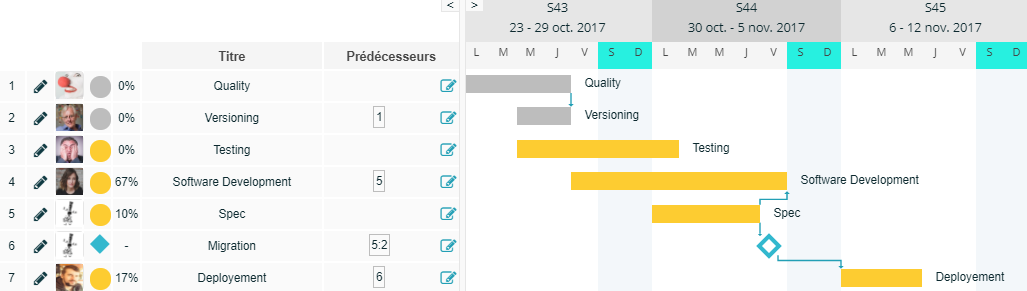
In such a context, building a Gantt chart makes it possible to visualize tasks over time.
In project management, a milestone represents a key project deadline, symbolized by a diamond shape in a Gantt chart.
The JOUROFF project management software provides a task planning tool that allows you to define deadlines for the different actions required up to project completion, as well as task dependencies through a Gantt chart.
However, some projects do not require task planning with deadlines, as the focus is placed on consumed days rather than delivery dates and deadlines.
This aspect of project consumption tracking is highlighted in our project management software to provide project managers with a global view in terms of costing and estimated budget per project portfolio.
Our project management interface also offers a module for planning forecasted days over time.
Project management use cases
Project budget tracking for funded organizations
For example, associations that must justify funding.
In this context, our software highlights activity modeling to represent key projects and KPIs.
You can define budget allocations and track time spent, forecast hours, or HR-related costs.
JOUROFF can be considered as management software for research organizations requiring funding justification.
As an ERP or engineering project software
If you are looking for project management software for engineering or consulting firms, our tool is well suited.
It offers resource planning, profitability tracking, and forecast management.
Our solution also allows generating reports on time entries, time-based billing, and invoicing breakdowns per project.
We provide a full ERP solution for managing engineering or architecture activities.
Project tracking combined with HR time management
Project management is often linked to employee working hours management.
Companies must also comply with labor agreements and contracts.
Some companies distinguish between project teams and hourly employees.
Our tool models both project and HR activities through activity categories.
This enables dual dashboards: one for HR tracking and one for project tracking.
Research tax credit tracking (CIR or CII)
Our tool can also be used to track research or innovation tax credits.
The objective is to monitor hours spent on R&D projects and identify eligible employees (e.g., PhD students or IT engineers).
This allows calculating eligible R&D personnel costs.
To link time spent with monetary value, the software includes a “budget rate” module that assigns hourly salary rates to projects.